
Requested articles
Under Requested articles, you can see which products customers have requested through PS in foodservice.
This gives you insight into how your product information is being used and helps you identify which products are actively used by customers.
PS Impact Score
If you participate in the PS Impact Score, you can find information about your participation and the available results in My PS.
Here you can gain insight into the sustainability results of your products.
To complete or update the product data required for the PS Impact Score, use Data Entry.
My commercial data
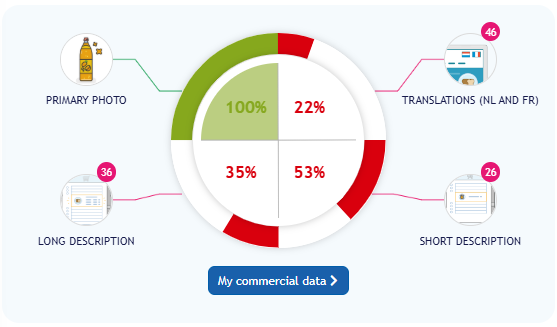
On the dashboard, the My commercial data section shows a pie chart with percentages. At a glance, you can see how complete the commercial information for your products is.
For example, you can see how many products have:
-
Primary image;
-
completed translations;
-
a short description;
-
a long description.
Click Commercial data to open the detailed overview.
My data quality
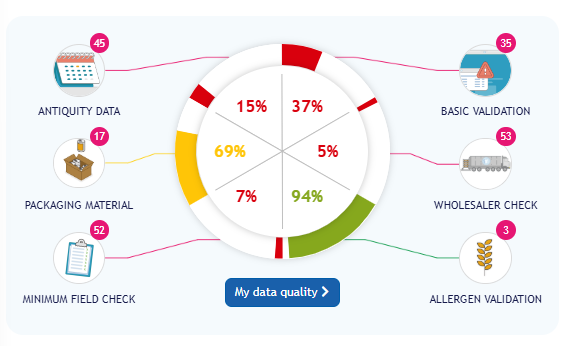
The dashboard also includes a pie chart that gives you insight into the data quality of your entered products.
Here you can find information about, among other things:
-
allergen validation;
-
packaging materials;
-
data recency;
-
additional nutritional values;
-
other validations.
Click this section to open the Data quality for my own brands overview.
Here you can see an overview of your brands in terms of data recency, packaging materials, additional nutritional values, and validations.
This helps you quickly identify which product information still requires attention or may need to be updated.
My brands
Under My brands, you can find an overview of the brands linked to your account.
From this section, you can check which brands are known to your organization and which brands are linked to the products you manage through PS in foodservice.
This overview is useful when you want to check whether a brand is already available before adding new products.
Digital Catalog
With the Digital Catalog, you can create a digital product catalog based on your product information in PS.
You can choose settings such as:
-
the assortment you want to display;
-
filters;
-
a title;
-
your own branding.
You can then share the catalog with customers or other interested parties.
What is the difference between My PS and Data Entry?
My PS is mainly used for insights, overviews, reports, and additional functionalities.
Data Entry is used to enter and update product specifications, such as:
-
ingredients;
-
allergens;
-
nutritional values;
-
packaging information;
-
images;
-
commercial product information.
Would you like to update your product information? You can do this in Data Entry.
Can't find what you need?
If you cannot find a particular section or have questions about the options available in your account, please contact support@psinfoodservice.com.