
- Via PS Data Entry: Use this method when you want to complete the information for one or a few products, or enter and check the data directly for each product. If you use ingredients from Master data > Ingredients, you must always enter the additional information via PS Data Entry.
- Via the “Enrich Your Products” Excel file: Use this method when you want to complete the additional information for multiple products at once. This is particularly useful for larger assortments.
Update multiple products using the “Enrich Your Products” Excel file
This Excel file allows you to provide additional information for multiple products at once, including:- Ingredients and sub-ingredients
- Valid English ingredient names
- Internal percentages
- Countries of origin
- Quality marks and certifications
HowGood uses this information to calculate the PS Impact Score as accurately as possible.
Download the “Enrich Your Products” Excel file
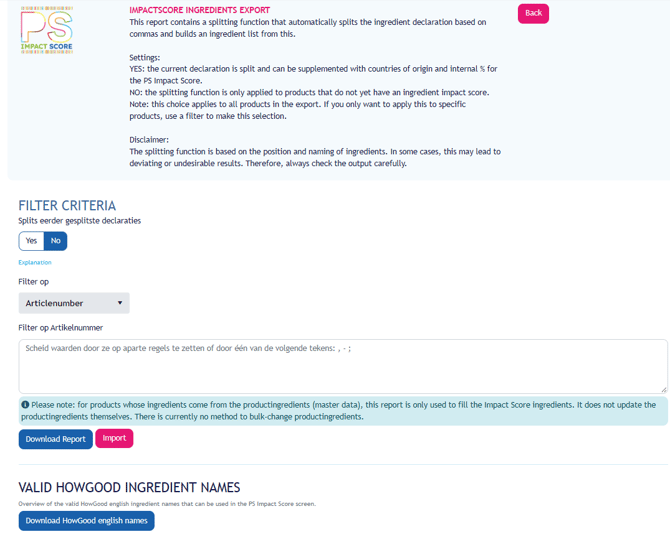
You can download the file via My PS:- Log in to My PS
- Go to PS Impact Score
- Click Enrich Your Products
- Download the report.
- Open the file in Excel.
How is the Excel file structured?
On the Ingredients tab, each ingredient or sub-ingredient is listed on a separate row. As a result, a product may appear on multiple rows.
At the beginning of each row, you will find information that identifies the product, such as:
- EAN
- Article number
- Brand
- Target market
- Product name
This information is automatically transferred from PS. Do not modify these columns.
The Sequence column shows how the ingredients are structured:
- 1,2 and 3 represent main ingredients.
- 1.1 and 1.2 represent sub-ingredients of ingredient 1.
- 2.1 represents a sub-ingredient of ingredient 2.
Check the ingredients and sub-ingredients
First, check that all ingredients are listed individually.
If a compound ingredient consists of several ingredients, it is important that these ingredients are also included as sub-ingredients.
For example, if the ingredient declaration states:
Vegetable oils (sunflower, rapeseed)
Then sunflower oil and rapeseed oil must each be listed separately as sub-ingredients.
HowGood calculates the impact of each ingredient individually. Breaking down compound ingredients allows the calculation to better reflect the actual composition of the product.
If any ingredients or sub-ingredients are missing from the Excel file, add them as new rows.
If a product has a long ingredient list, start with the ingredients that make up more than 2% of the product. These generally have the greatest influence on the calculation. Where possible, complete the information for the remaining ingredients afterwards.
Enter the English ingredient name
Where possible, enter a valid English ingredient name for every ingredient and sub-ingredient. HowGood uses this name to link the ingredient to the correct raw material and its associated environmental data.
Use the most specific English name possible. For example, enter wheat flour rather than simply flour.
You can find the list of valid ingredient names at the bottom of the Enrich Your Products section via the button Download HowGood English names.
If an ingredient does not appear under exactly the same name in the available list, choose a slightly more general name. For example, specific apple varieties such as Elstar and Jonagold are mapped to apple.
If an ingredient is completely missing from the list, email support@psinfoodservice.com. HowGood’s research team can then investigate whether the required data can be added.
If you cannot enter a valid English ingredient name, you can still import the file. If no matching ingredient is available, HowGood will search for a comparable ingredient. However, this may reduce the accuracy of the calculation.
Enter internal percentages
For each ingredient and sub-ingredient, enter the internal percentage from the product recipe. It concerns the actual proportion of the ingredient present in the product. This may differ from the percentage stated on the label in accordance with the QUID rules.
The internal percentage of the ingredients must descend in order, at the level of main ingredients
In the percentage column, enter the number only, without the percentage sign.
For example:
- 70 for 70%
- 22.5 for 22.5%
The percentages of the main ingredients must add up to 100%.
For example, a product may consist of:
- Dough: 70%
- Filling: 30%
The filling may then consist of:
- Apple: 22.5%
- Sugar: 6%
- Cinnamon: 1.5%
The sub-ingredients of the filling add up to 30%, which matches the percentage of the main ingredient Filling.
Internal percentages are only used by HowGood to calculate the PS Impact Score. This information is not publicly visible.
Specify percentage precision
In addition to the internal percentage, the Excel file contains a column for Precision.
Use:
- = when you enter an exact percentage.
- < when the ingredient accounts for less than the percentage entered.
If you do not know the exact percentage, or do not want to disclose it, but the ingredient makes up less than 2% of the product, enter:
- Precision:<
- Internal %:2
This will be interpreted as less than 2%.
Use <2% only for ingredients that actually make up less than 2% of the product or compound ingredient.
Enter the country of origin
For each ingredient and sub-ingredient, enter the country where the raw material is actually produced or grown.
Please note that this is not:
- The country where the finished product is assembled.
- The country where the supplier is based.
- The country where the raw material is purchased or traded.
Use the country names exactly as they appear on the Country Master Data tab. This ensures that the country is recognised during import.
If an ingredient comes from multiple countries, enter the countries in the same cell, separated by commas.
For example:
Netherlands, Spain
You can specify a maximum of five individual countries per ingredient or sub-ingredient.
If an ingredient comes from many different countries, or the exact distribution is unknown, use the following options where applicable:
- EU-27 when the ingredient comes from multiple countries within the European Union.
- Global when the ingredient is sourced worldwide.
These values are based on weighted averages and provide a better estimate than arbitrarily selecting several countries.
If you know the exact distribution between countries of origin, enter this information as specifically as possible. The more accurately the origin is known, the better HowGood can account for differences between producing countries.
Enter quality marks and certifications
If an ingredient has a quality mark or certification, enter it for the relevant ingredient.
Examples include:
- Organic
- Fairtrade
- Rainforest Alliance
Only use quality marks available on the Quality marks tab, and copy the names exactly as listed.
If an ingredient has multiple quality marks, enter them in the same cell, separated by commas.
Only assign a quality mark to the ingredient it actually applies to. For example, if only the cocoa is Rainforest Alliance certified, enter the certification only for the cocoa.
Check the following:
- Which ingredient the quality marks applies to.
- Whether the quality mark is still valid.
- Whether the entire ingredient or only part of it is certified.
- Whether you have used the correct quality mark from the available list.
Use the supporting tabs
In addition to the Ingredients tab, the Excel file contains several supporting tabs:
- Country Master Data: Contains the valid country names.
- Precision: Contains the permitted values for percentage precision.
- Quality marks: Contains the available quality marks.
Use these supporting tabs to select the correct values, but do not modify or delete these tabs.
Check the file before importing
Before importing the completed Excel file, check that:
- All ingredients and sub-ingredients are listed correctly.
- English ingredient names have been entered wherever possible.
- Internal percentages have been entered as accurately as possible.
- The correct precision indicator, = or<, has been used for percentages.
- The percentages of the main ingredients add up to 100%.
- The percentages of sub-ingredients add up to the percentage of the corresponding main ingredient.
- The correct countries of origin have been entered.
- Country names match the values in the Country Master Data tab.
- Certifications and labels have only been assigned to the relevant ingredients.
- All certifications and labels used are listed on the Quality marks tab.
- The original structure of the Excel file has not been modified.
Import the completed file
Once you have finished completing the information:
1. Save the file as .xlsx.
2. Return to My PS.
3. Open PS Impact Score.
4. Select the option to import the Enrich Your Products Excel file.
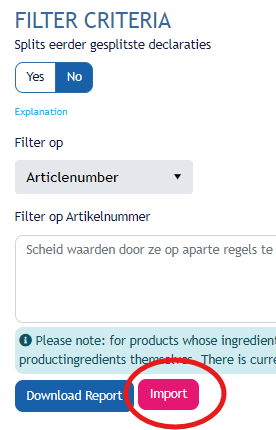
5. Select the completed file.
6. Start the import.
7. After the import, check whether any notifications indicate that certain data could not be processed.
You do not need to complete all products in the file in one go. You can also import the file while work is still in progress.
If you want to continue later, download a new, up-to-date Enrich Your Products Excel file from My PS. This ensures that you are always working with the latest product information.
The more complete the additional information, the more accurately HowGood can calculate a PS Impact Score that reflects the actual product.
If you need assistance, please contact support@psinfoodservice.com.