
The PS Impact Score is calculated based on the product specifications in PS. To make the calculation as accurate as possible, HowGood needs additional information about the ingredients and sub-ingredients of a product.
You can enter this additional information in two ways:
- Via Data Entry: use this method when you want to supplement one or a few products or want to fill in and check the data directly per product. Do you work with ingredients via the pedigree? Then you always fill in the additional information via Data Entry.
- Via Enrich your products Excel: use this method when you want to supplement the additional information for multiple products at the same time. This is especially useful with a larger assortment.
In this article, we explain step by step how to complete the information via Data Entry, which data you enter per ingredient and what you need to pay attention to.
Do you want to replenish multiple products at once? Then read the article about Enrich your products Excel.
Data Entry
Use Data Entry when you want to add one or a few products or want to check the information directly per product.
- Open Data Entry.
- Find the product you want to restock.
- Open the product.
- Go to the PS Impact Score tab.
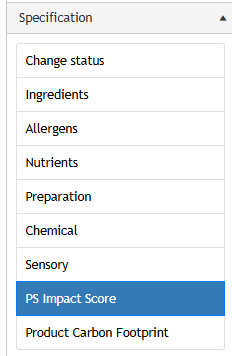
The next steps depend on the way in which the ingredients are entered into the product.
Route 1: ingredients via the master table
Do you use ingredients from the pedigree with the product? Then first transfer these ingredients to the PS Impact Score tab.
- Open the PS Impact Score tab.
- Click Copy product ingredients.
- Check that all ingredients and sub-ingredients have been copied correctly.
- Fill in the additional information for each ingredient.
- Save the changes.
You can supplement, among other things:
- internal percentages;
- countries of origin;
- valid English ingredient names;
- labels, where applicable.
Changes to the PS Impact Score tab will not affect the ingredient list shown with the product.
Route 2: ingredients via a declaration
Do you use an ingredient declaration instead of ingredients from the master table? Then have the claim split up automatically first.
- Open the PS Impact Score tab.
- Click on Split ingredients declaration.
- Check that the ingredients are broken down correctly.
- Adjust the order or add missing sub-ingredients.
- Fill in the additional information for each ingredient.
- Save the changes.
The system splits the claim based on, among other things:
- commas;
- sub ingredients in parentheses.
Always check the split manually. An ingredient declaration can be structured in different ways, meaning that not every ingredient will automatically be placed correctly.
What additional information do you fill in?
Fill in the following information for each ingredient and sub-ingredient where possible:
- the valid English ingredient name;
- the internal percentage;
- the country or countries of origin;
- quality marks or certifications.
The more complete and accurate you fill in this information, the better the calculation matches the actual composition of the product.
Check ingredients and sub-ingredients
First, check that all the ingredients are included individually. Does a compound ingredient consist of multiple parts? Then add these parts as sub-ingredients.
For example, does the list of ingredients say:
vegetable oils (sunflower, rapeseed)
Then enter sunflower oil and rapeseed oil separately as sub-ingredients.
HowGood calculates the impact per ingredient. By breaking down composite ingredients, the calculation is more in line with the actual composition of the product.
Tip: Does the product have a long ingredient list? Start with the ingredients that make up more than 2% of the product. These ingredients generally have the greatest impact on the calculation. Then, where possible, complete the information for the remaining ingredients as well.
Selecting a valid English ingredient name
Enter a valid English ingredient name for each ingredient and sub-ingredient. HowGood uses this name to link the ingredient to the right raw material and associated environmental data.
You can find the correct name in Data Entry in two ways:
- In the English ingredient name field, type. Suggestions appear immediately as you type.
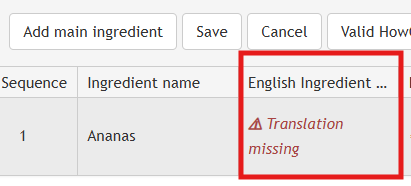
- Access the entire library of available names via Valid HowGood ingredient names.

Both options use the same list. Choose the method that works the fastest for you.
Always select the name that best describes the actual ingredient. Use a description that is as specific as possible. For wheat flour, for example, choose wheat flour and not just flour.
Is the ingredient not exactly listed? Then choose a slightly more general name. For example, specific apple varieties such as Elstar and Jonagold are not listed separately in the library. In that case, select apple.
Is the ingredient completely missing from the list? Please email support@psinfoodservice.com. The HowGood research team can then investigate whether the ingredient can be added to the database.
When a valid English name is missing, a message appears with the ingredient. This message is a signal and not a blockade. You can simply save the product, and a score can still be calculated.
HowGood chooses a similar ingredient itself in the event of a missing link. As a result, the calculation may be less accurate. Each valid ingredient name that you select yourself will help improve the quality of the calculation.
The message can also appear for products that have been in PS for some time. Nothing has gone wrong. The previously entered name can only be linked to the HowGood library even more accurately.
Fill in internal percentages
Fill in the internal percentage from the recipe for each ingredient and sub-ingredient. It is about the actual proportion in which the ingredient occurs in the product.
This percentage may differ from the percentage stated on the label according to the KWID rules. Therefore, use the internal recipe and not automatically the percentage from the declaration.
The percentages of the main ingredients should add up to 100%.
For example, a product can consist of:
- dough: 70%;
- filling: 30%.
The filling can then consist of:
- apple: 22.5%;
- sugar: 6%;
- cinnamon: 1.5%.
The sub-ingredients of the filling add up to 30%, equal to the percentage of the main ingredient.
Do you not know the exact percentage, or do you not want to specify it, but is the share lower than 2%? Then select <2%.
It is better to indicate that an ingredient makes up less than 2% than to omit the ingredient completely.
Use <2% only for ingredients that actually make up less than 2% of the entire product or the compound ingredient.
Enter country of origin per ingredient
Indicate for each ingredient and sub-ingredient which country the raw material comes from.
The country of origin can have a lot of influence on the calculated impact. Agricultural methods, energy use, yields and changes in land use can differ from country to country.
Select the country where the ingredient or raw material is actually produced or grown. This does not refer to:
-
the country where the finished product is assembled;
-
the supplier’s country of establishment;
-
the country where the ingredient is purchased or traded.
Do you know the distribution by country of origin? Then create a separate rule for each country and fill in the corresponding percentage.
For example, does an ingredient come for 30% from the Netherlands and 70% from Spain? Then add two lines:
- ingredient – Netherlands – 30%;
- ingredient – Spain – 70%.
This allows HowGood to take into account the actual distribution of the origin.
You can select up to five individual countries per ingredient or sub-ingredient. Does an ingredient come from many different countries or is the exact distribution not known? Then choose:
- EU-27 when the ingredient comes from different countries within the European Union;
- Global when the ingredient is sourced globally.
EU-27 and Global are based on weighted averages for the relevant market. This often provides a better estimate than selecting multiple individual countries without percentages. When individual countries are selected without a distribution, each selected country is given the same weight.
Therefore, use:
-
Individual countries with percentages when you know the distribution;
-
EU-27 or Global when the ingredient comes from many different countries and the exact distribution is unknown.
Add labels per ingredient
Does an ingredient have a quality mark or certification? Then add this to the ingredient in question.
For example:
- organic;
- Fairtrade;
- Rainforest Alliance.
Only link a label to the ingredients to which it actually applies. Does only the cocoa have a quality mark? Then add the label to cocoa and not automatically to all other ingredients or the entire product.
Check in the process:
- which ingredient is eligible for the label;
- whether the certification is still up to date;
- whether all or part of the ingredient is certified;
- whether you have selected the correct quality mark from the available list.
Review the data before you save
Before saving the data, make sure that:
- all known ingredients and sub-ingredients are present;
- compound ingredients are broken down where possible;
- each ingredient is linked to a valid English ingredient name;
- the internal percentages are filled in as accurately as possible;
- the percentages of the main ingredients add up to 100%;
- the percentages of the sub-ingredients match the percentage of the main ingredient;
- the correct countries of origin and relationships have been entered;
- EU-27 or Global is used when the exact distribution over many countries is not known;
- the labels are linked to the right ingredients.
Then save the data. The additional information is shared with HowGood for calculating the PS Impact Score.
The more complete and accurate you fill in the data, the better the calculation matches the actual product.
If you need any help, please contact support@psinfoodservice.com.