
Adding ingredients via Master data
In the product, go to Specification > Ingredients.
- Select the required ingredients from Master data.
If an ingredient is missing, add it via Master data > Ingredients.
Please note: If you change an ingredient in Master data, this change will be applied to all products that have this ingredient selected.
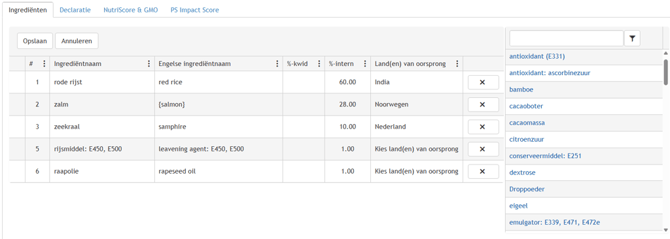
- Check the order.
- If necessary, drag ingredients to the correct position.
- Fill in the following, if applicable:
- QUID percentage (%-kwid)
- Internal percentage (%-intern)
- Country(ies) of origin (Note: “EU” cannot be selected as a country of origin)
Countries of origin can also be specified for sub-ingredients.
Click the triangle next to the ingredient to enter the countries of origin for the sub-ingredients. Enter the QUID percentage in Master data itself.